Skip to content
DE See the packs

Pick a pack.James sets it up for you.

Packstart is your AI assistant for Mac, Windows and Linux. Its name is James, and it works where you can see it.

Order from €24.99: every new pack released after that is yours free.

Applies to every order from €24.99 at full price, including several single packs together, and retroactively to earlier orders. Until further notice. Terms

James, the light core from the app

READY

BETA 5.0arrives on Sunday, 15 November, at 12:00 CETis coming shortly. This page checks every minute.

2days00hrs00min00sec

BETA 5.0is here.

Download now
:
PLANNED TODAY3
  • 10:00Write the proposalnext
  • 13:30Lunch
  • 15:00Edit music video
TODAY · DONE1/4
25 %
DUECLIENT PROJECT
4DAYSSend the proposal

Sample view with sample values.

James free · Packs from €9.99 incl. VAT · JamesBeta 5.0 for Mac, Windows and Linux

James understands 1112 languages and answers in them. Deutsch · English · Türkçe · Español · Français · Italiano · Português · Polski · Nederlands · العربية · Русский · 日本語

Packstart with James is free and runs on your own AI account, for example your Claude subscription. Packs are a one-time purchase, no subscription. Prices

  • 01Your day at a glanceMorning briefing, next step, project status.
  • 02The next appointmentOn the dial under “Your day”.
  • 03Tasks and projectsWhat is done and how far each project has come.

This is James, Work view. One click switches to the large James view.Sample view with sample values.

Packs. Buy once, download right away.

You buy them once in the Packstart shop (in German), no subscription.

What is a pack?

Ready-made skills, fixed roles (agents), workflows, widgets and tested prompts for one topic.

What does it cost?

All 13 for €49.99, all finance packs €24.99, Video and Creator €24.99, Smart Home with James and Start a Business with James €49.99 each, Learn with James and Job Applications €14.99 each, single packs from €9.99. In our beta offer, new packs are free when you order €24.99 or more at full price.

The bundles

Many packs for one price.

3
From €24.99: new packs free

All 13 packs€49.99

Everyday life, Work and Creator in one download, cheaper than one by one. The ADHD Calendar is not a medical device. Bookkeeping and Legal files only sort things, they give no advice.

Not included: Finances, Video and Creator, Learn, Job Applications, Smart Home, Start a Business

From €24.99: new packs free

Finances complete€24.99

All five finance packs, plus Tax Dates. Your numbers, sorted and checked. Facts with sources, no recommendations, no tax, financial or investment advice. You decide.

24 widgets, Tax Dates includedTax Dates in German only

From €24.99: new packs free
Made by James

Video and Creator€24.99

Raw footage in, finished edited video out, with subtitles. James never posts on his own.

12 workflows, 3 widgets, computer onlyHiggsfield and Submagic optional, only with your Claude subscription and your own paid account there

New

Smart Home with James and Start a Business with James at €49.99 each, Learn with James and Job Applications at €14.99 each.

4

Smart Home with James€49.99

Your home listens to you: lights, heating, blinds and scenes by voice through your Home Assistant. By default James asks before every change, scenes start right away.

Mac, Windows and Linux, from Beta 5.0, with your Home AssistantNot an alarm system, in an emergency, call emergency services (112 in the EU)

Start a Business with James€49.99

Your own business, step by step: James checks your business idea honestly, works out your price and writes your business plan and financial plan as Word and Excel files.

Mac and WindowsNo legal or tax advice, nobody can promise success

Learn with James€14.99

For you or your child: drop in the notes, then say “Quiz me.” James quizzes by voice and plans up to the exam.

Mac, Windows and LinuxFor children and teens, parents manage the AI account

Job Applications€14.99

CV and cover letter as a Word file, matched to the job ad. James practises the interview with you.

Mac and Windows, with Word or LibreOfficeNo job guaranteed, you send your application yourself

See all single packsSingle packs€9.99 each, ADHD Calendar €14.99

Buy single packs in the Packstart shop (in German).

Everyday life

4 packs

ADHD Calendar€14.99

Your day from fixed anchors, breaks and real time slots.

Not a medical device. Helps you plan your day; it does not treat anything and does not replace diagnosis or therapy.

Training€9.99

Your plan, your sessions and your real progress.

Inbox€9.99

Deadlines, money and real enquiries from your mail at a glance.

Communication€9.99

Drafts for messages and emails that sound like you.

Work

6 packs

Conversations€9.99

Commitments, amounts and deadlines from your conversations.

Only record conversations if everyone involved has agreed.

Weekly cockpit€9.99

Once a week: where do your areas stand?

Clients and visibility€9.99

Sort enquiries, prepare replies, research brands.

Website check€9.99

Checks your website on ten points.

Bookkeeping€9.99

Missing receipts, subscriptions and open invoices at a glance. No tax advice.

German only: built around German law and German authorities.

Legal files€9.99

Every letter becomes a file with a deadline. No legal advice, you check deadlines yourself.

German only: built around German law and German authorities.

Creator

3 packs

Content€9.99

Video ideas from moments that happen anyway.

Creator management€9.99

Weekly overview, shooting plan and replies for your channel.

Release planner€9.99

A steady release rhythm and a plan for each song.

Finances

Your numbers, sorted and checked. Facts with sources, no recommendations, no tax, financial or investment advice. You decide.

5 packs, Tax Dates included

Budget and Spending€9.99

Budget, subscriptions and month-end from your bank statements. No account is connected.

Invoices and Receipts€9.99

Type up receipts, find missing ones, track invoices. Tax Dates as a bonus.

Portfolio and Crypto€9.99

Holdings and results from your portfolio and crypto exports. Read only. Not investment advice.

Markets and Figures€9.99

Watchlist and key figures, always with source and time. Not investment advice.

Goals and Strategy€9.99

Savings goals, reserve and decisions with your numbers. You decide.

Start for free

James and the Packstart app cost nothing.

Packstart appBeta

Your James on your phone: write, talk, tap approvals and call. Needs an up-to-date James on your computer, which has to be on for it.

iPhone with iOS 16.4 or later. Android 7 or later, as an app file straight from packstart.de. How it works

Why a pack?

  • Ready-made. Workflows, templates and widgets are set up.
  • Skips the setup. You save the messages James would otherwise need to build it, and the share of your plan's usage they would take. What a task itself uses depends on the task.

Bookkeeping, Legal files and Tax Dates are only available in German, because they are built around German law. Bookkeeping and Legal files are included in the bundle of all 13 packs. The widgets show example values.

New in James

Free for everyone with James. Beta 5.0 arrives on Sunday, as an update via “Check for updates”.

Everything new in Beta 5.0

The Packstart app for your phone

  • James calls you
  • You call James
  • Pair by QR code
  • Several tasks in one call

iPhone and Android, free.

On iPhone from the App Store, on Android as an app file straight from packstart.de.

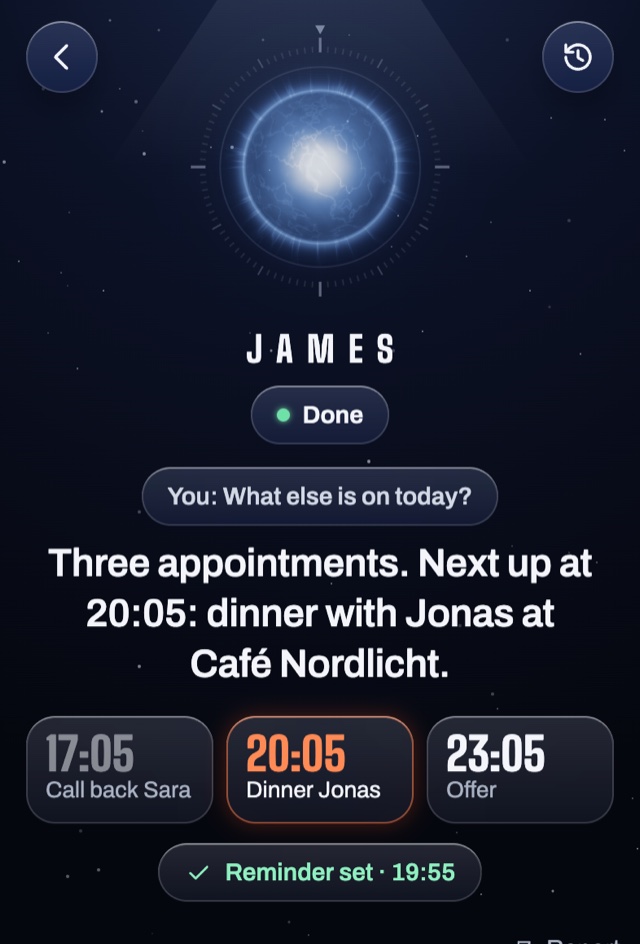
The Packstart app: James lists the next appointments and sets a reminder.
Example

Your morning, as a call if you like

Appointments, important mail, open tasks.

You see right away what James does for you

Three questions, three suggestions, he does one right away.

Allow everything, on a Mac James clicks for you

One button for every lock you can switch off. James then sends WhatsApp messages and Apple Mail without asking, to other people too, and deletes files without a card. On Windows he shows you where to click for now. Paying you do yourself.

Faster and smoother

The voice speaks right away and lets you finish.

Mail and calendar

Send mail from James after your click, several calendars in one view.

New languages

Arabic and Russian, with parts of the window still in English there.

Everything new

  • Calls both ways, even when the app is closed, once you allow notifications. The James window has to be open on your computer.
  • James times two: a fast one talks to you, the big one works behind him.
  • Russian James speaks only on powerful computers, otherwise he answers as text.
  • Newsletters James clears out with undo, for real mail he still asks.
  • Banking: by default James only shows you where to click. With “Allow everything” he clicks and types there too on a Mac. Passwords, PINs and TANs you always type yourself.
  • More AI: Packs run with Claude, ChatGPT and Gemini. A small AI right on your computer works with Ollama, which you install yourself.
  • Installing: Mac notarized by Apple, Windows with a warning until Microsoft approves the signature. When you update, packs, mail, calendar and memory stay connected.
  • Fixed from your reports: mailbox on Windows, crashes, voice, downloads, Telegram, Linux links.

Three steps, then you're talking to James.

  1. Download

    Get James under Download for €0. What to click on first launch is explained there.

  2. Connect your AI account

    In Packstart, choose Claude, ChatGPT or Gemini. For Claude and ChatGPT, you then sign in with the provider in your browser. James never sees your password. You connect Gemini with your Google account (on Mac and Windows) or your own Gemini API key. James shows you all the details first, and nothing starts until you tick the box.

  3. Add packs

    Tap “Packages” in the menu, then “Add a purchased package”, and choose the ZIP file. No need to unzip it. Older version of James? The way is on packstart.ai/download.

What James can do, without a pack

  • Your day at a glance: morning briefing, next step, project status.
  • Remembers your projects and notes, on your computer.
  • Searches the web when you ask and puts widgets in the window on request.
  • Type or talk. Voice and speech recognition run on your computer.

Packstart with JamesBeta 5.0

Mac
Apple silicon or Intel, macOS 13.5 Ventura or later
Windows
Windows 10 or 11, 64-bit
Linux
64-bit (x86_64) with glibc 2.34 or later, for example Ubuntu 22.04
Computer
At least 8 GB of memory (RAM), 16 GB recommended, just under 3 GB free. Fastest with Apple silicon.
You need
Your own AI account: Claude subscription (Pro or Max), ChatGPT account with Codex, Gemini with your Google account (on Mac and Windows) or your own API key, or API access.
Cost
Packstart with James is free. You pay for your AI account directly with the provider.
Age
16 or older, as our terms of use say. Your AI provider has its own rules: Anthropic requires 18 for the Claude subscription.
Not needed
A Packstart account, a pack to get started, or programming skills.
Get it free for Mac, €0 Via the Packstart shop (in German) for €0, no account needed. Our terms of use apply to the order, and you get the download link right away and by email. Packstart runs on a computer, not on a phone. On your phone, get it here anyway and open the email later on your computer. Download not working? On packstart.ai/download you can resend the email.

News by email optional

You will get an email to confirm. You are only signed up after you click the link in it.

Opening it for the first time

Packstart is still a beta. Some things may still be rough. Then write to us via “Help and support” in James or at support@packstart.de. Only download Packstart via packstart.de and the Packstart shop.

  1. Drag Packstart into your Applications folder.

  2. Open it. macOS asks once, Packstart is checked by Apple (notarized).

  3. Tap “Check for updates” in the menu once.

Bring your own AI account.

Claude subscription (Pro or Max), ChatGPT account or Gemini, with your Google account (on Mac and Windows) or your own API key. Claude and ChatGPT also work together. You pay the provider directly; it is not part of our offer.

Claude with one click. Sign-in happens only on Anthropic's own page. Packstart never sees your password.

ChatGPT with one click. James connects through OpenAI's Codex program with your ChatGPT account. This is not an official OpenAI route: OpenAI may restrict or suspend your ChatGPT account for it, and the limits of your ChatGPT plan apply. Answers only appear once they are finished. Nothing starts until you tick the box.

Other ways. Claude API access or your own OpenAI API key, billed by usage. A key stays protected on your computer and never goes to Packstart.

Gemini with your Google account (on Mac and Windows) or your own API key. If you use your Google account for it, this is not an official Google route: Google may restrict or suspend your account for it and may review your input, including people at Google reading it. What it costs then depends on your Google account. You get your own API key in Google AI Studio. Your Google project needs active billing for it, and Google bills you directly by usage.

What it costs. Every question counts towards the usage limits of your Claude subscription or ChatGPT plan. If you have bought Codex credits, Codex also uses them once your plan's allowance is used up. With your own API key from OpenAI or Google, James stops after 100 tasks a day by default. How much is used and how it is billed is up to each provider.

Connections: James works with your apps

On the Mac, James uses Calendar, Reminders, Contacts, Notes and Mail through the apps there; macOS asks you for permission once. On any computer, James can also read your calendar through a calendar link, and you confirm new events yourself. With a Claude subscription, James uses the connectors in your Claude account, such as Gmail or Google Calendar. These are not available through ChatGPT or API access. What James may do without asking is under Your data, “You decide”.

What stays on your computer. What goes out.

Short and honest. All details are in the privacy policy (German only).

Stays on your computer

  • Your notes, widgets, history and settings. They sit in the data folder on your computer.
  • Your voice input. Recognition and reading aloud run on your computer; your recordings don't leave it, except in calls between computers: then your voice goes encrypted to the other computer. Only if you switch on ElevenLabs or Fish Audio in Settings do the sentences James reads aloud go to that service as text.
  • Your password for Claude, ChatGPT or Google. You sign in directly with the provider in your browser, and James never sees it. Keys you enter in James, for example for OpenAI, ElevenLabs, Fish Audio, Telegram or your mailbox app password, are stored securely on your computer and only go to that provider.
  • Packstart sends us no content, no usage statistics and no ID of your installation. No ads, no tracking. The only exceptions are the Packstart app and calls between computers: their messages travel encrypted through a mailbox at our service provider, and only the paired devices can read them.

Goes out, and where

To your AI provider

What you ask, and what James reads to answer, goes through your own account to Anthropic (Claude), OpenAI (ChatGPT, Codex or your OpenAI key) or Google (Gemini) and is processed there under their rules. If a calendar is connected, the times and titles of today's and tomorrow's events go along with your questions, and on the Mac your due reminders too. When James searches the web, your AI provider runs the search. Claude Code also sends Anthropic technical usage and error data. What James remembers about you goes along with your questions, and with the Video pack also the transcript and still frames of your video. If you run James locally with Ollama, your questions stay on your computer. Only screen help and images for his browser then go through Claude, ChatGPT or Gemini, if you have also connected one of them. Packstart receives none of it.

During setup and for Claude Code updates

If Claude Code is missing, Packstart downloads it directly from Anthropic and then checks there for a new version at most once a day at startup. For ChatGPT, OpenAI's Codex program comes once via npm, and for Gemini, Google's program comes once via npm or from Google. Voice and hearing come once from packstart.de, GitHub and Hugging Face, and on Windows a component from Microsoft if needed. For Word, PowerPoint and Excel files, large PDFs, mail and the Video pack, components come once via npm, and for the Video pack, after you agree, also ffmpeg and Chrome. These providers see your IP address.

Check and updates

On first start, and when you let James check your computer, Packstart sends one empty request each to packstart.de and to Anthropic to see whether both can be reached. James asks packstart.de for updates when you click or, if you allowed it on first start, when you open James and then every 12 hours while James is open. Our host Netlify sees your IP address.

Only when you use it

James fetches a calendar link from your calendar provider about every five minutes. Web pages you ask James to read, ElevenLabs, Hevy, sevDesk, Fish Audio, your mail provider, Telegram or WhatsApp when you write to James from your phone, Higgsfield with the Video pack, our mailbox once you pair the Packstart app or a second computer, and connections you add yourself are reached directly from your computer. When James calls you and you allowed notifications in the app, the notification service Expo (USA) gets the notification that James would like to talk to you and the address your phone receives notifications at, nothing from your conversations. While the Bitcoin price widget is on screen, James asks packstart.de for the price about once a minute. The finance packs fetch prices and data from the US securities regulator SEC, the European Central Bank and mempool.space, and with your own key also from Alpha Vantage, CoinGecko and Etherscan. When you search for new skills with James, the search words go to the skills.sh catalogue. These providers see your IP address. All providers are listed in the privacy policy (German only).

Whether Anthropic or OpenAI use your data for training is a setting in your account with that provider. With Gemini and your own API key, your Google project needs active billing. Under Google's terms, Google does not use your prompts and the responses from this paid use to improve its products. If you connect Gemini with your Google account instead, Google may review your input, including people at Google reading it.

You decide: what James may do without asking

Questions.

Anything else? Write to support@packstart.de or use “Help and support” in James. What gets transferred is explained in the privacy policy (German only).

Which AI account should I use?

Claude is best: with your Claude subscription (Pro or Max) James can do the most. Pro is enough to start. ChatGPT works too, but it is not an official OpenAI route. Gemini works with your own Gemini API key and also with your Google account (on Mac and Windows), but that is not an official Google route. Under 18? Anthropic only allows Claude from 18, and Gemini with your own key also requires 18. ChatGPT works (OpenAI requires your parents’ permission under 18), or James locally with Ollama.

Does Gemini work too?

Yes. You connect Gemini in Packstart with your Google account (on Mac and Windows) or your own Gemini API key. If you use your Google account for it, this is not an official Google route: Google may restrict or suspend your account for it and may review your input, including people at Google reading it. With your own key, Google bills you directly by usage.

Does James see everything on my computer?

No. James only sees what you give him: the folders you share (your whole user folder if you like) and the connections you set up. He only looks at your screen if you switch on screen help. Before sending or deleting, he asks you by default, and you always confirm paying, buying and ordering yourself. One exception on Windows: if you switch on commands for ChatGPT there, a command can read everything you can read. That’s why they are off by default.

Is WhatsApp with James safe?

James connects to your own WhatsApp with a QR code, as another linked device like WhatsApp Web. This isn’t an official WhatsApp method, and WhatsApp may ban accounts connected this way for a while or for good. That’s why James shows you a warning first, and you decide. Messages James reads, including those from your contacts, go to your AI provider through your AI account, like everything else. By default, James only sends after your approval.

Does James read my emails, on Windows too?

Yes, with any AI. Under “Mail”, connect your mailbox with your address and an app password, for example Gmail, GMX, WEB.DE or STRATO. When you tap, James summarises an email or drafts a reply. With Gemini you read the email in James, summarising and drafting do not work with Gemini yet. An email only goes out once you click “Send” and then “Yes, send it”. Microsoft accounts don’t work this way yet; on a Mac it works through Apple Mail.

What does “Allow everything” do?

It removes all confirmations and locks that you are allowed to switch off yourself: James works without asking, including commands, screen help and his browser, and sends WhatsApp messages and Apple Mail without asking, to other people too. “Locks back” restores everything. Passwords, PINs, TANs and card details you always type yourself, and you make the last click when paying and for stock-exchange orders. James doesn’t solve captchas, and he gives no investment, tax or legal advice.

Can I use Packstart at work?

Yes. Check first whether your AI plan fits the data: in the EU, Claude Pro and Max run under Anthropic's consumer terms, and for business use Anthropic offers Team, Enterprise and API access. With ChatGPT, also check your plan. You are responsible for customer or employee data. Packstart receives none of it.

Which packs do I get for free?

If you order packs for €24.99 or more at full price, whether a large pack like All 13 packs or several single packs together, you get every pack newly released at Packstart after your order for free. This also applies retroactively to earlier orders. A single pack under €24.99 does not count, and separate orders are not added up. The offer runs until further notice. All details are in the beta offer.

Can I use James on two computers?

Yes. Each James has its own memory, and as a team they work together through a shared cloud folder. You may use your packs on all of your own computers. If a second person works with you, they need their own packs.